Electronic invoices that also collect

Mensualia issues the invoices of the monthly fees through a PAC, sends them to each family by WhatsApp or email, collects them with Yappy and reminds whoever has not paid. Your school stops chasing payments one by one.

I want it!

We will write to show you how it would work at your school.

The video is coming very soon

Meanwhile, this is how Mensualia looks: the school's invoices at a glance, and the family that gets its own by WhatsApp.

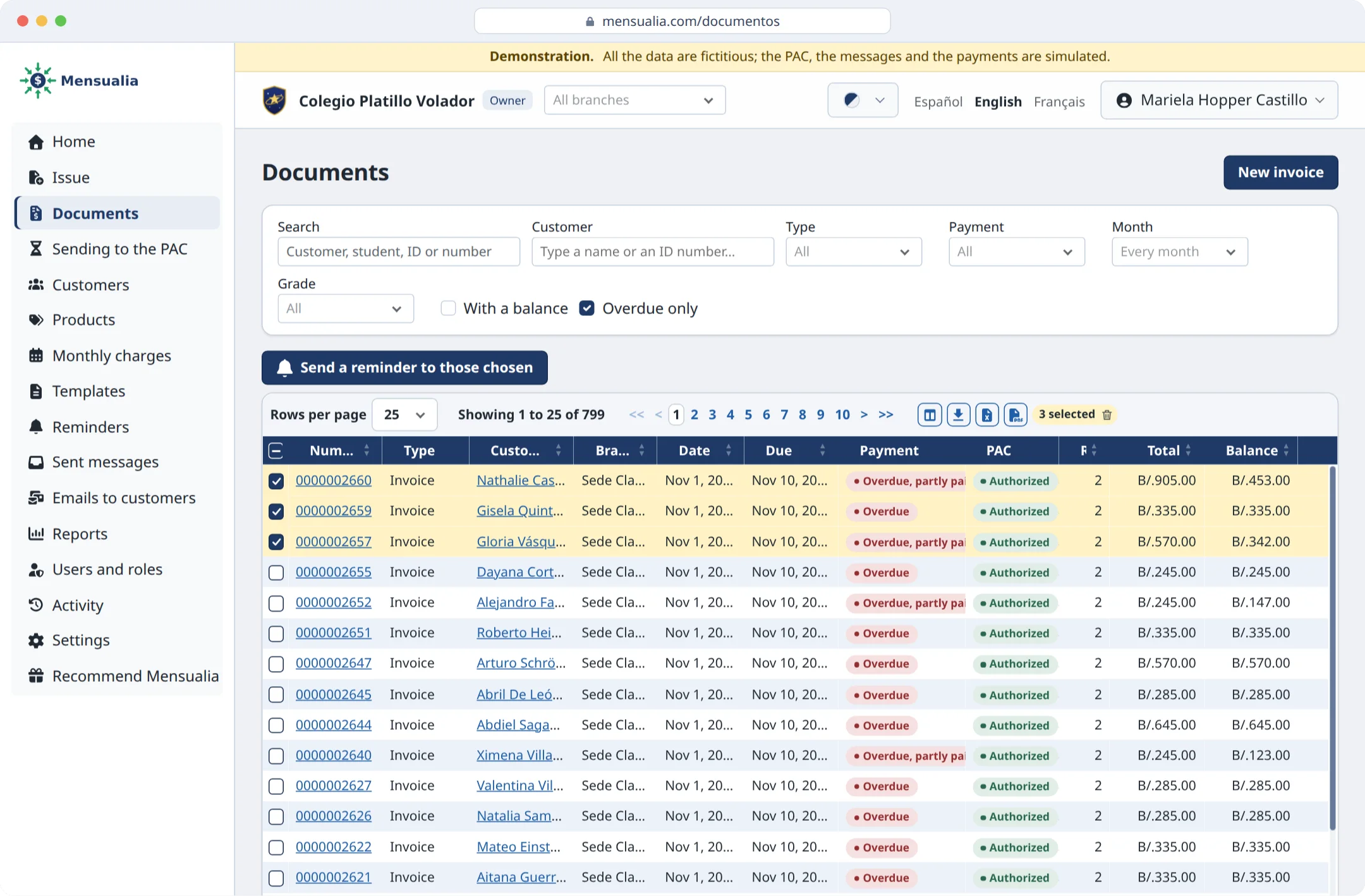
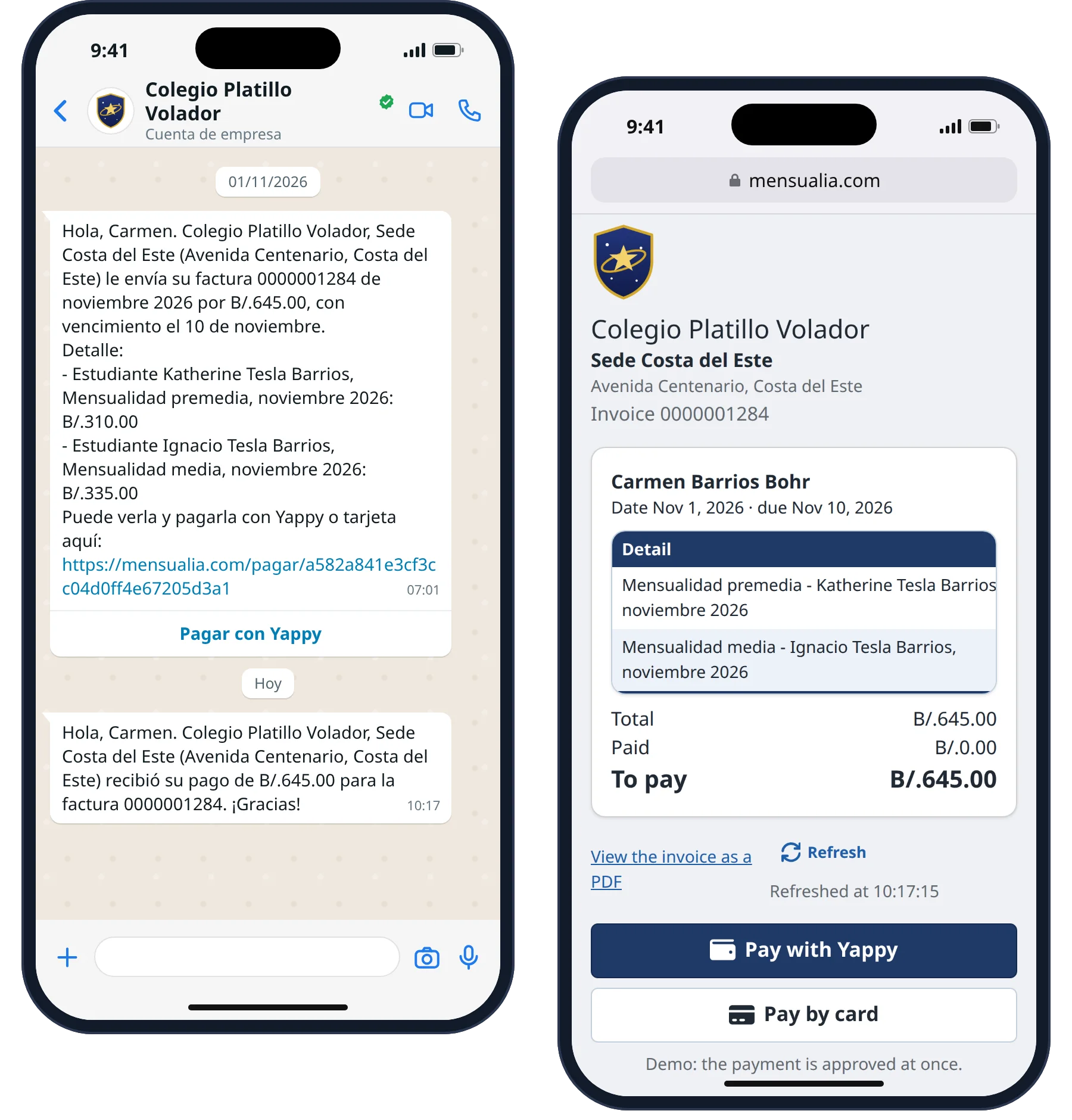
A school's documents, only the overdue ones, with three families chosen to be sent a reminder. A drawing of the family's WhatsApp chat, with their invoice and their receipt, and the payment page its link opens.
A school year with Mensualia: every monthly fee is issued, sent by WhatsApp and collected, month after month.

The presentation

Go through the slides with their buttons or by swiping. Tap a screen to see it larger.

Issuing is only half the work

  • Since 2026, most businesses invoice through a PAC, a company authorized by the DGI.
  • Many signed up for a portal that only issues: sending each invoice, collecting it, knowing who paid without checking the bank and reminding whoever has not paid are still done by hand.
  • The school issues hundreds of identical invoices every month and then chases the payments one by one.
  • One in two private schools had operating problems because of late payments (Acodeco, 2025).
Next
18,000+ businesses had to leave the DGI's free invoicing tool on January 1, 2026
Issue, send and collect in one place

  • Issues the electronic invoice of every monthly fee, with the ITBMS calculated.
  • Sends it by WhatsApp or email, with the detail of what is charged.
  • Collects it with Yappy from the same message; a transfer is reported with its receipt and confirmed against the bank.
  • Reminds before and after the due date, without manual work.
  • Shows who paid and who owes, and leaves everything ready for the accountant.
Previous Next
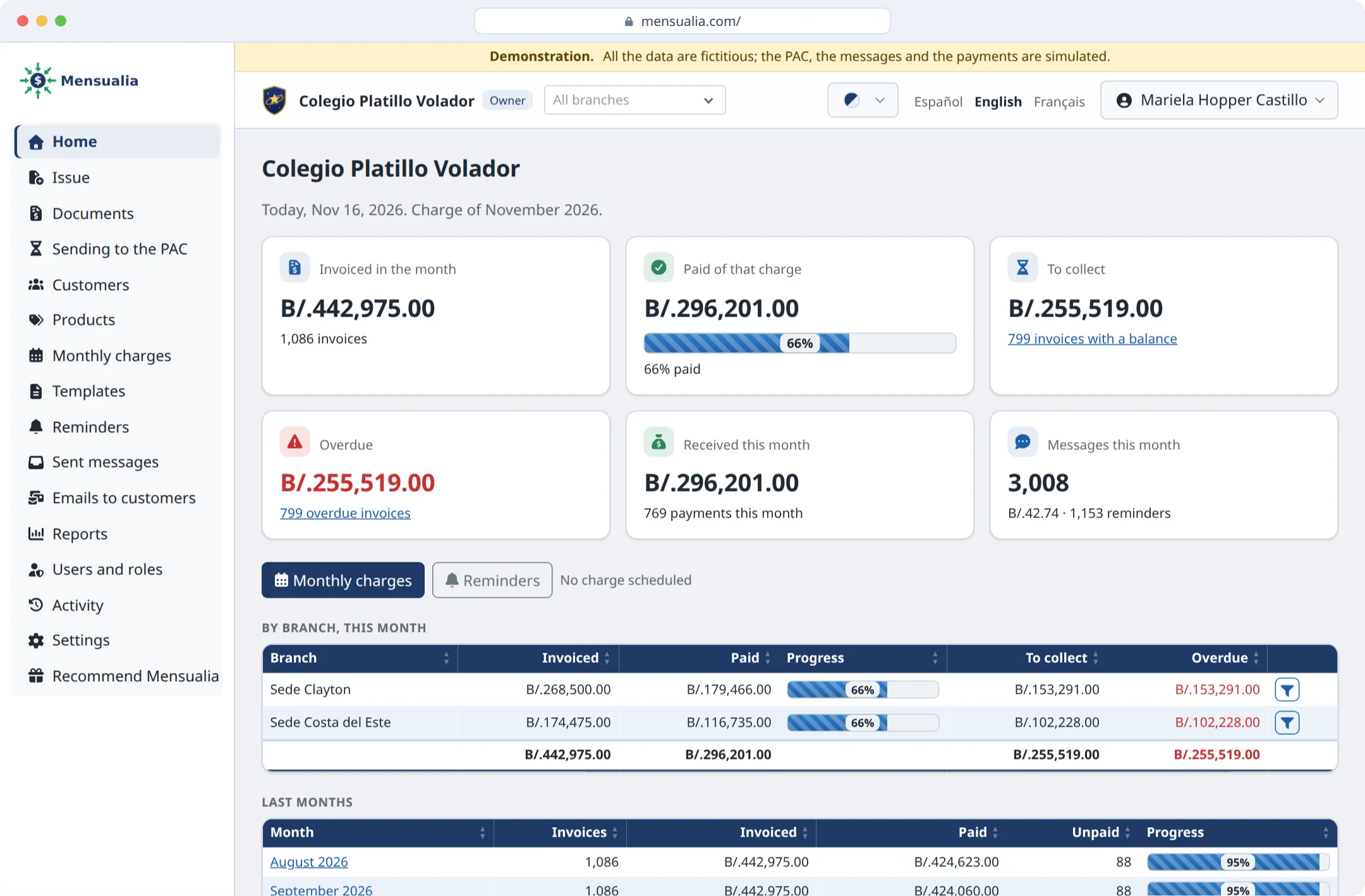
The home page of a school's portal: what was invoiced and paid this month, what is left to collect, what is overdue and each campus.

All of the school's invoices at a glance

  • Each invoice with its status at the PAC and whether it is paid.
  • Search by family, student or ID; a filter shows who has not paid.
  • With one click, each family that owes receives its reminder with its balance and its payment link.
Previous Next
A school's documents, only the overdue ones, with three families chosen to be sent a reminder.

The family pays from the message

  • They receive the invoice by WhatsApp or email, with the detail of what they pay.
  • They pay with Yappy from the same message, or report their transfer with its receipt.
  • They get their receipt at once, and the school sees the invoice paid without checking the bank.
Previous Next
A drawing of the family's WhatsApp chat, with their invoice and their receipt, and the payment page its link opens.

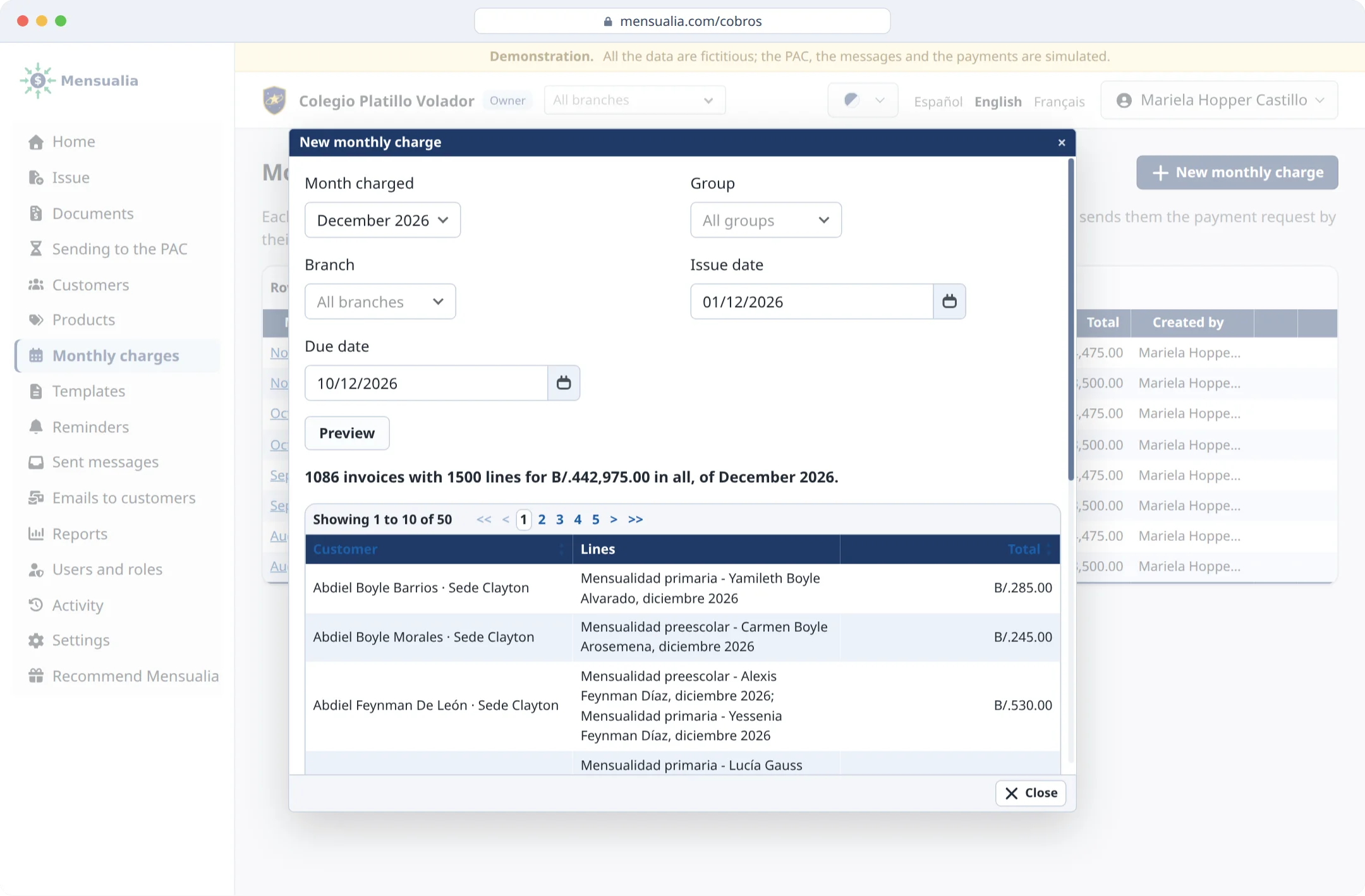
The month's charges, in minutes

  • Issues every student's monthly fee at once, one invoice per family, with transport or cafeteria in the detail.
  • Schedules the admission and enrollment fees with their due dates.
  • Reviewed in a preview, then issued at once or scheduled for the issue date.
Previous Next
The preview of December's charge: one invoice per family, with what each one is charged.

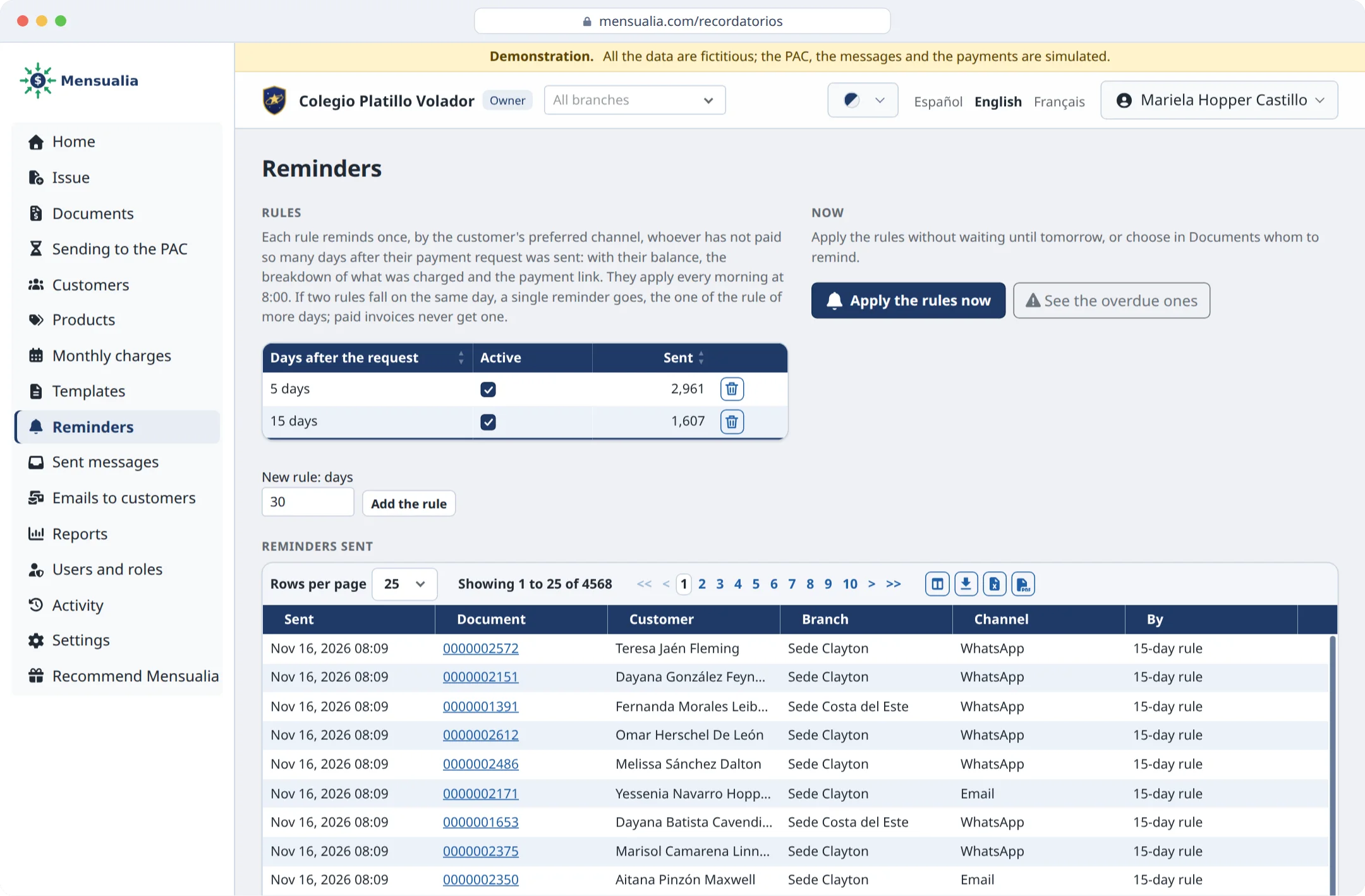
Reminders and emails that work on their own

  • The school decides how many days after the payment request to remind; every morning the reminders go out by themselves to whoever has not paid.
  • A paid invoice never gets a reminder.
  • Emails to every family or to a group, say third grade with a balance, each with their name and what they owe.
  • They go out from the school's own address, with its logo and a link to unsubscribe.
  • Whoever pays by transfer reports it with its receipt from their link; their reminders wait until the school confirms it in its bank.
Previous Next
A school's reminders: its rules, 5 and 15 days after the payment request, and those already sent by WhatsApp, email or SMS.

More than monthly fees

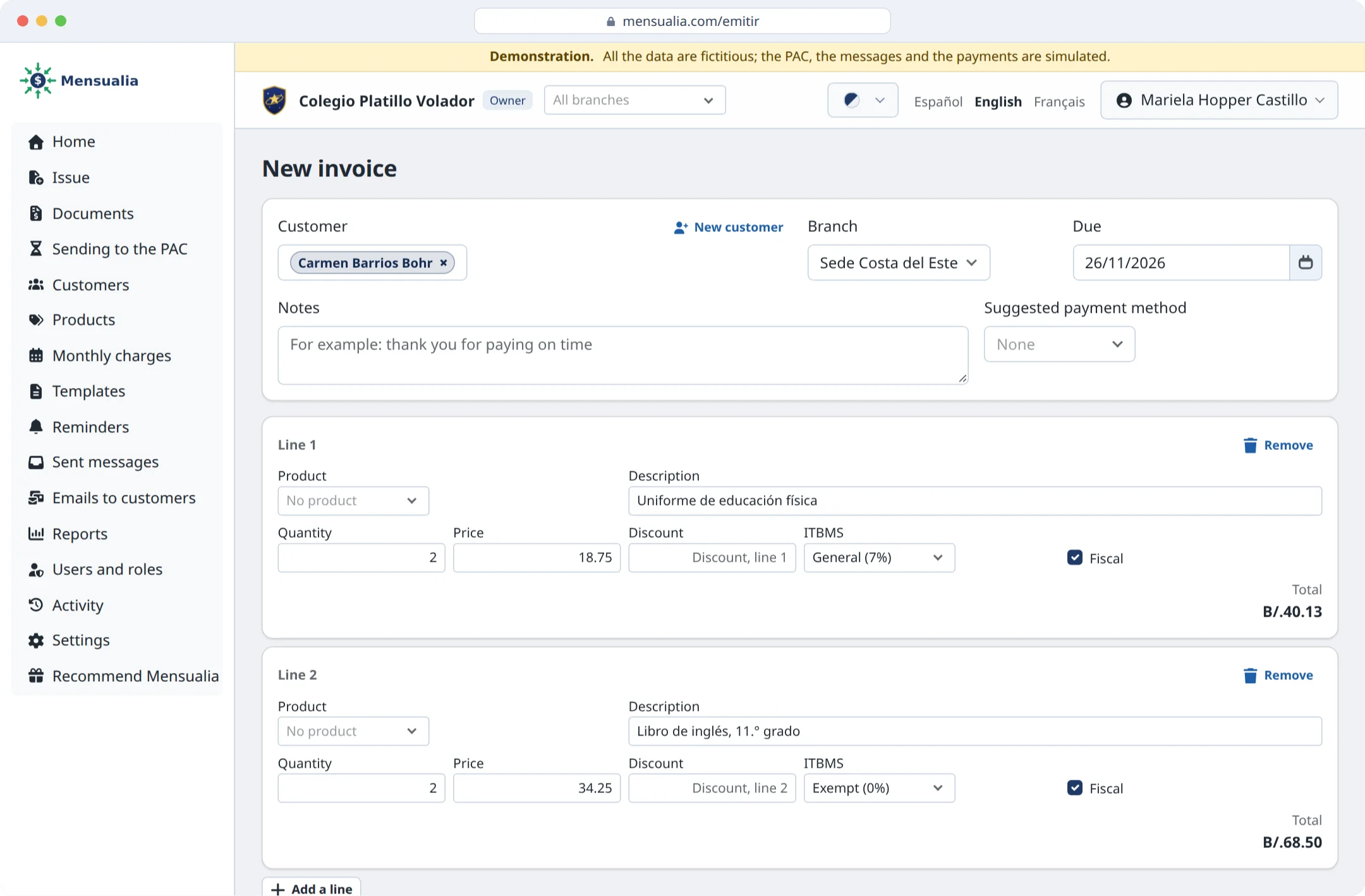
  • Orders for uniforms, books or field trips, invoiced at once or with the monthly fee.
  • One-off invoices when needed, and credit or debit notes to correct one already authorized.
  • Payments at the front desk are recorded by hand; transfers, by importing the bank statement, which finds each one by the invoice number. The family gets its receipt.
Previous Next
An invoice by hand for a family: two uniforms with their ITBMS and two exempt books, with the total worked out.

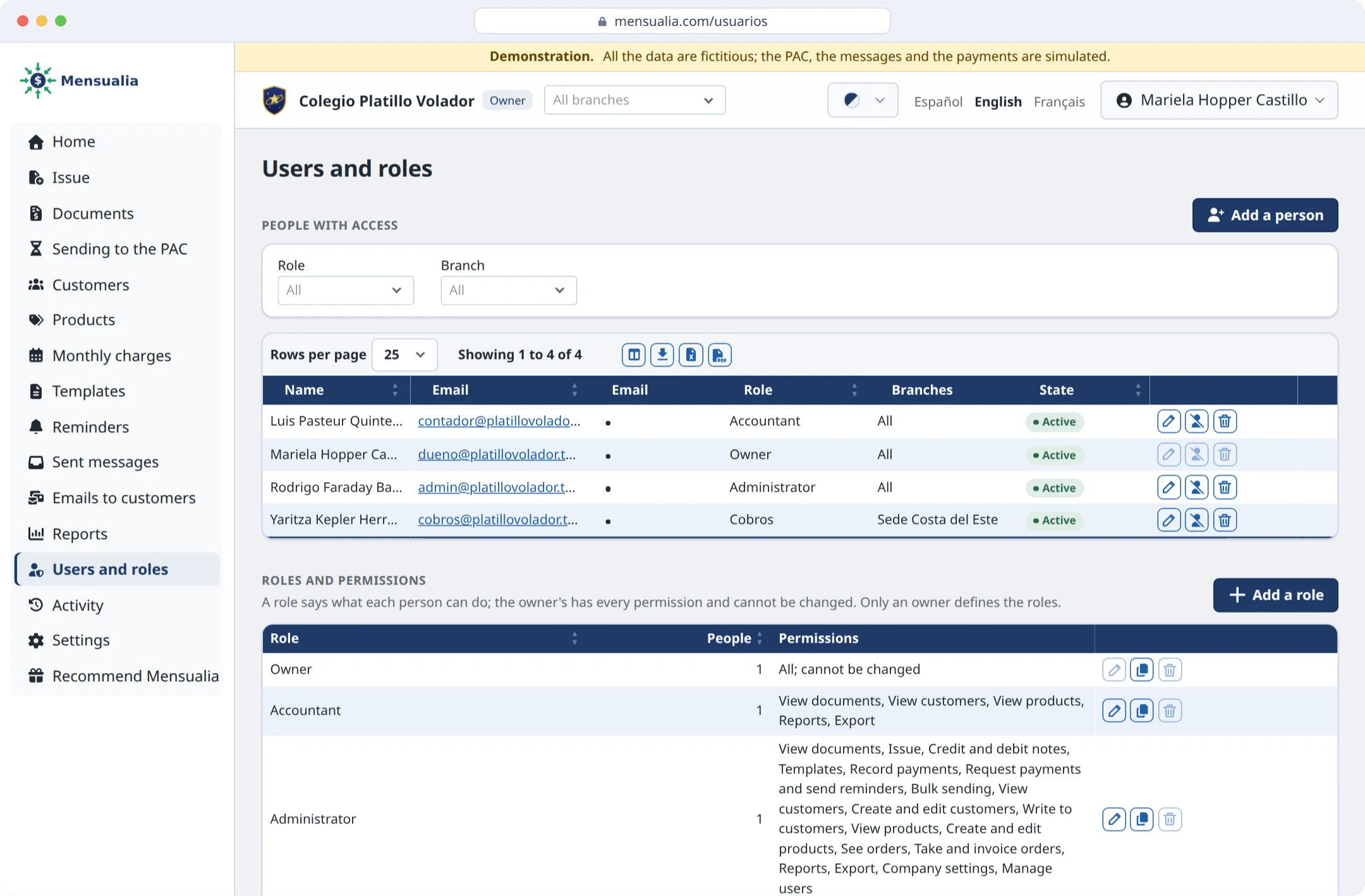
Every campus and every person in their place

  • Each campus numbers its invoices, and their figures show together or one by one.
  • Each person logs in with their own user and sees only their campus and what their role allows.
  • The school defines its roles: who only looks and who issues, collects or writes to families.
  • A six-digit code to log in, and a record of who did what.
Previous Next
A school's users and roles: who has access, with which role and in which campuses, and what each role allows.

Hand in hand with the accountant

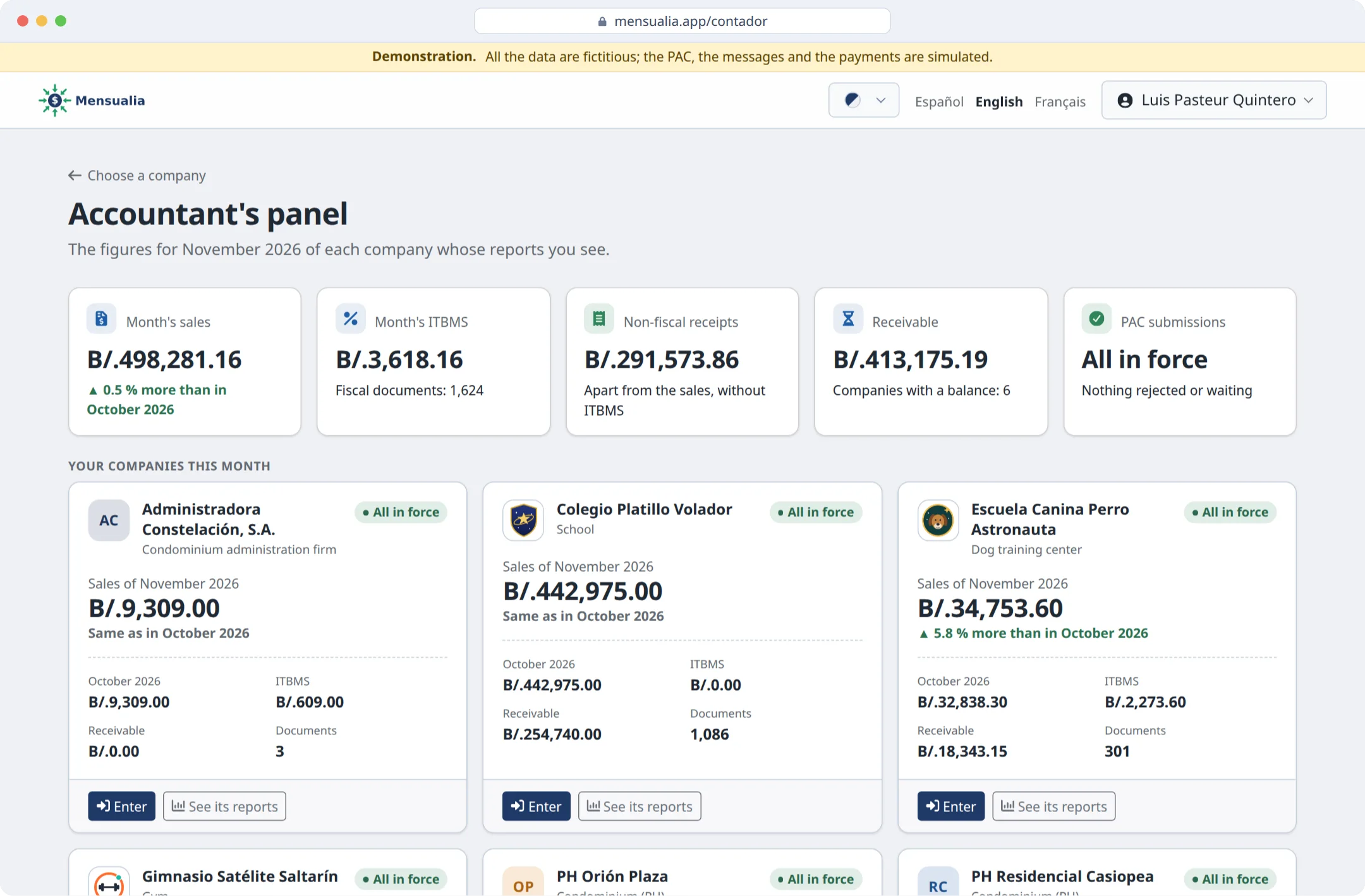
  • With a single login, the accountant sees all their client companies in one panel.
  • Sales this month and last, the ITBMS, what is left to collect and what waits for the PAC.
  • They open the sales reports by day, month or campus, and download them.
  • Their role only looks: it cannot change anything.
Previous Next
The accountant's panel: one row per client company, with its sales this month and last, its ITBMS, what it is owed and its status with the PAC.

Getting started is easy

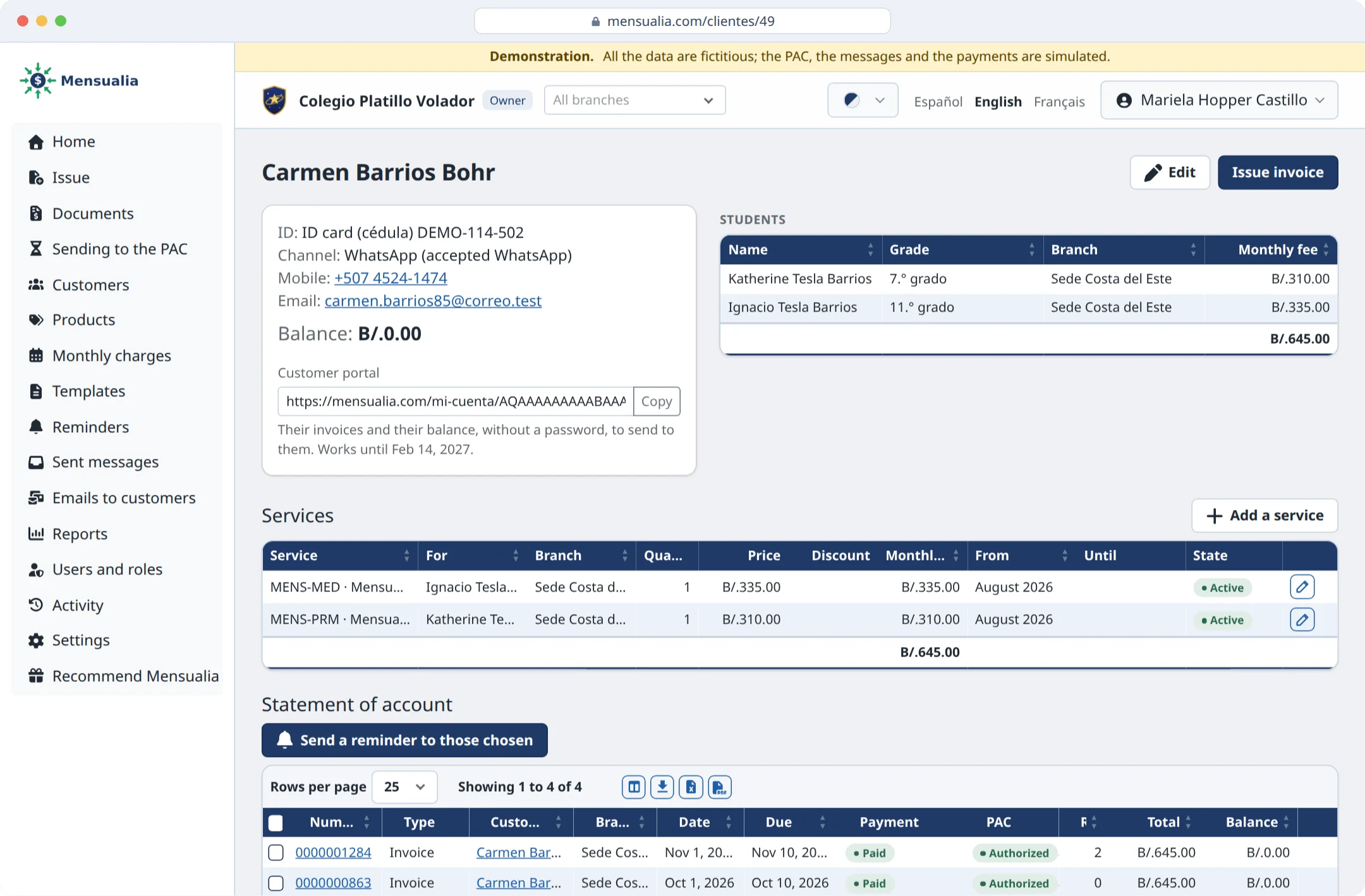
  • The account is created online; the school uploads its logo and its electronic signature.
  • Families, students and their fees are loaded from an Excel workbook, with a preview of each row before saving.
  • Each family with its services, such as transport, cafeteria or a discount, at its own price.
  • The portal in Spanish, English or French, as each person prefers.
Previous Next
A family's page: its two students with their monthly fee, their services and its account, with what it paid and what it owes.

From the school's Excel, in minutes

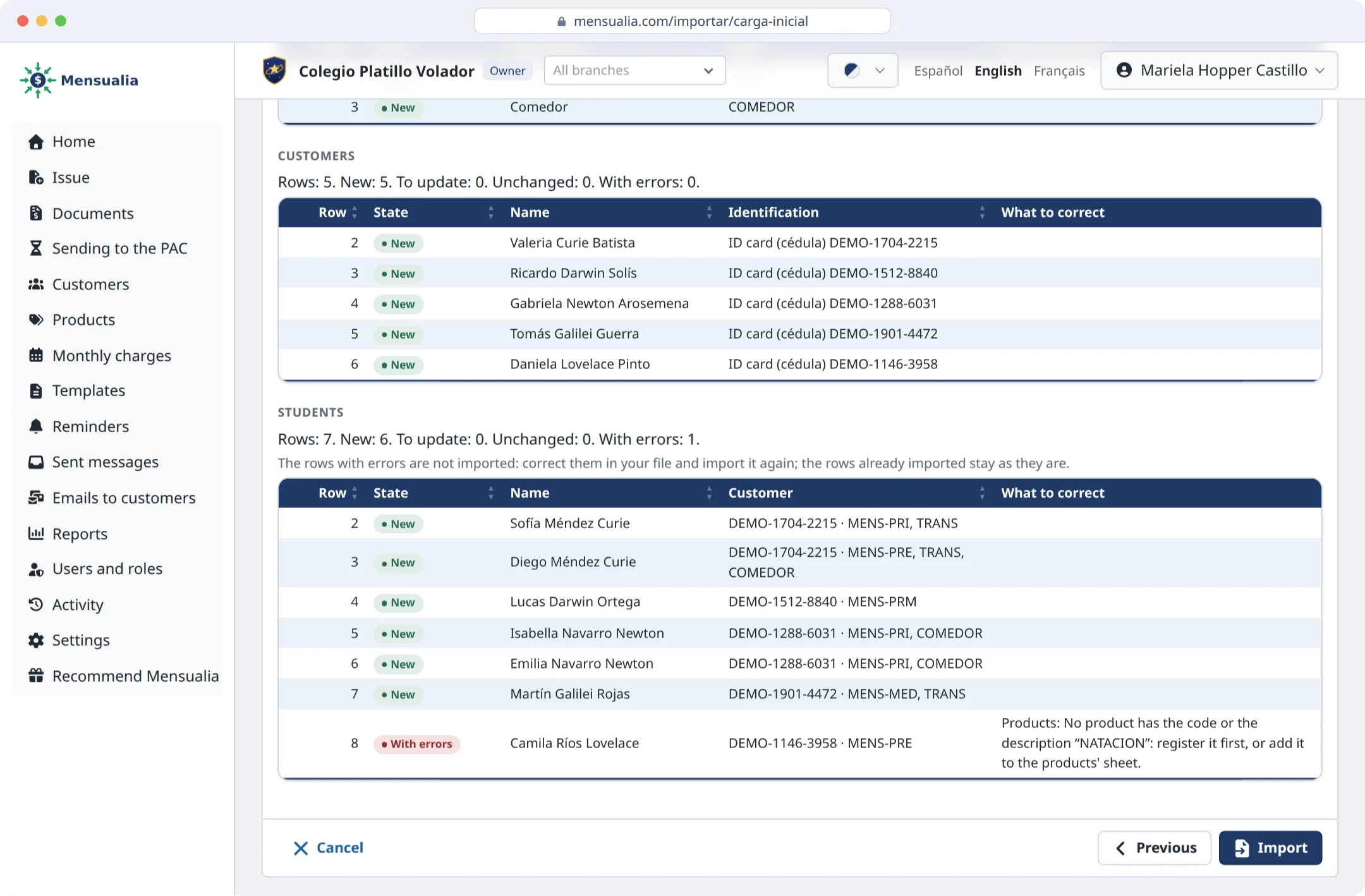
  • One template of three sheets: the services with their prices, the families and the students, each with their monthly fee, transport or cafeteria.
  • Columns are recognized by the names the school gives them, such as “Cédula”, “Guardian” or “Grade”, in Spanish, English or French.
  • Before anything is saved, a preview says what each row will do and what to correct, in plain words.
  • Everything is imported in one go, and the month's charge can go out.
Previous Next
The preview of the initial data: the new families and their students, each with their monthly fee, transport or cafeteria, and the row left to correct.

What makes it different

  • It collects, not only issues: invoice, send, collect and remind in one place.
  • Made for monthly fees and designed for schools, not a generic system.
  • Electronic signature solved: we help you get it and keep it safely.
  • Hand in hand with the accountant: they see everything without the school sending them anything.
Previous
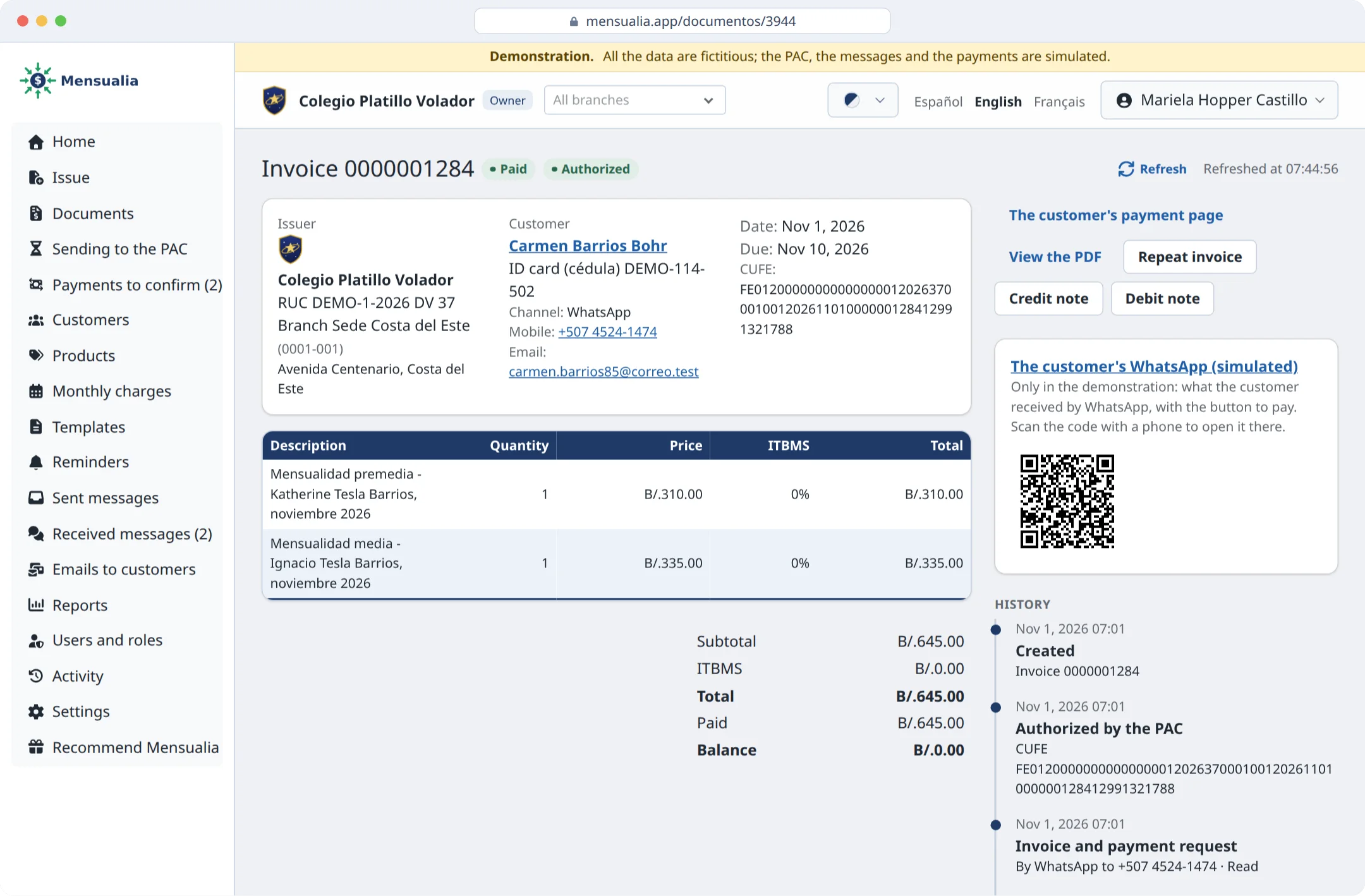
A paid invoice and its history: approved by the PAC, sent by WhatsApp, reminded, paid with Yappy and with its receipt.
I want it!

We will write to show you how it would work at your school.

I want the pilot

Leave us your details and we will write to show you Mensualia with your business's data.

We use these details only to contact you about Mensualia; we do not share them with anybody.

Kind of business

A WhatsApp or an email, at least one, to contact you.